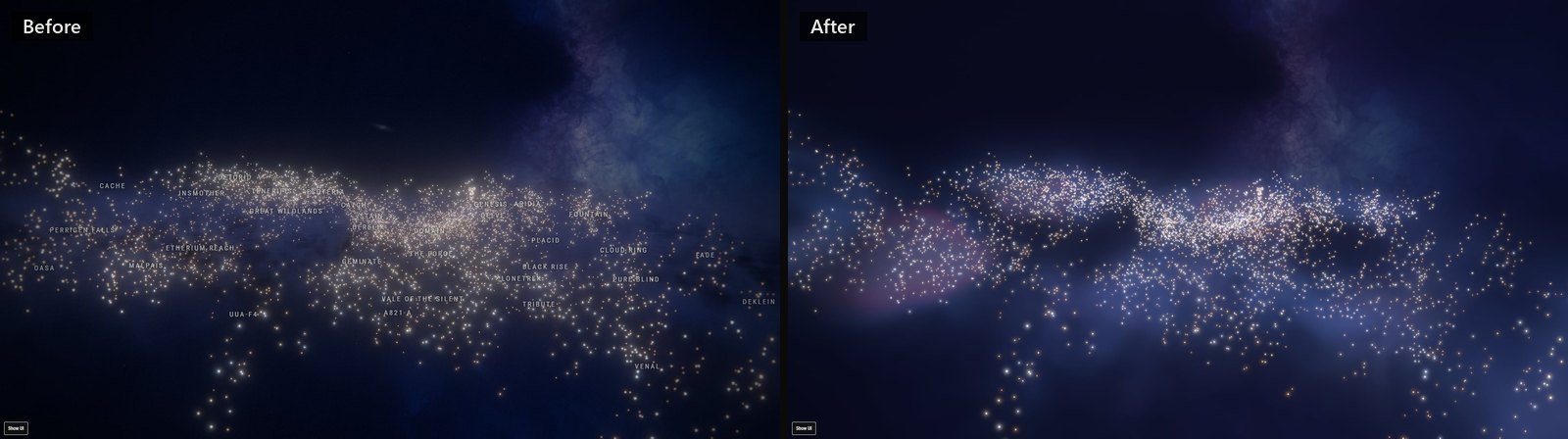
Cinematic Mode is my guilty pleasure. It doesn't plan a route or show you a market or tell you who died in Jita. It turns the map into something you just look at. I think New Eden, the universe CCP has built for EVE Online, is deep and vast, and a universe like that should give you a sense of wonder. Cinematic Mode is how I try to get some of that onto the screen.
EO-Map got it on day one, because EO-Map started as a copy of my other map, EF-Map, which is for EVE Frontier. Over there Cinematic Mode goes back to August 2025, twelve days after the first commit. Since then, every time a better model came out, or I just thought of an effect I wanted to see, I'd go back and add to it. Gas between the stars, supernovas, a film look, lens effects. Creator Mode, which I added this September for people making videos, was built on top of the same code.
So after about 15 months it was fixes on top of fixes and layers on top of layers. It looked good, I think, but it was heavy and it had got hard to change. This is the story of having it rebuilt from scratch, on EO-Map first and then on EF-Map, with one shared engine under both. From the first prompt to live on both sites took four and a half days.
I've put this on the EF-Map blog as well, with that map's own pictures and timings.
Why now
Two things lined up. Anthropic released Fable 5.2 on 9 November, and I had a couple of usage resets banked on my Claude plan. So on the 12th I asked the agent a fairly open question. Look at how Cinematic Mode is drawn today, and tell me honestly whether a rebuild is worth it or whether I'm just going to burn a week and end up with the same thing.
The answer was more specific than I expected. To draw one frame of the old film look, the map was rendering the whole scene four times and then running about six more full-screen passes over the result. That was several times the cost of the normal map. The old Creator window on EO-Map had 201 controls in it, and a lot of them only existed because some layer underneath needed a knob. Each of those layers was a good step when it went in. Stacked up, they were the problem.
A throwaway page first
I'm a vibe coder. I don't read the code and I don't want to. So how this works is that I say what I'm after, the agent comes back with what it found and a suggestion, and there's some back and forth until there's a plan I'm happy with. For something visual, a written plan isn't much use to me though. I need to see it.
So before anything was built, the agent made a throwaway page. Not part of either map, never shipped, just the stars and a new way of drawing gas, with sliders on it. It started with a mood board of real photographs, Hubble's Orion and the Pleiades and the Lagoon nebula, and I said which ones I liked and which I didn't. I didn't like the hard sculpted infrared look at all. Then it was rounds. Eleven of them over two days. The agent would build a version, I'd fly around it and say what was wrong.
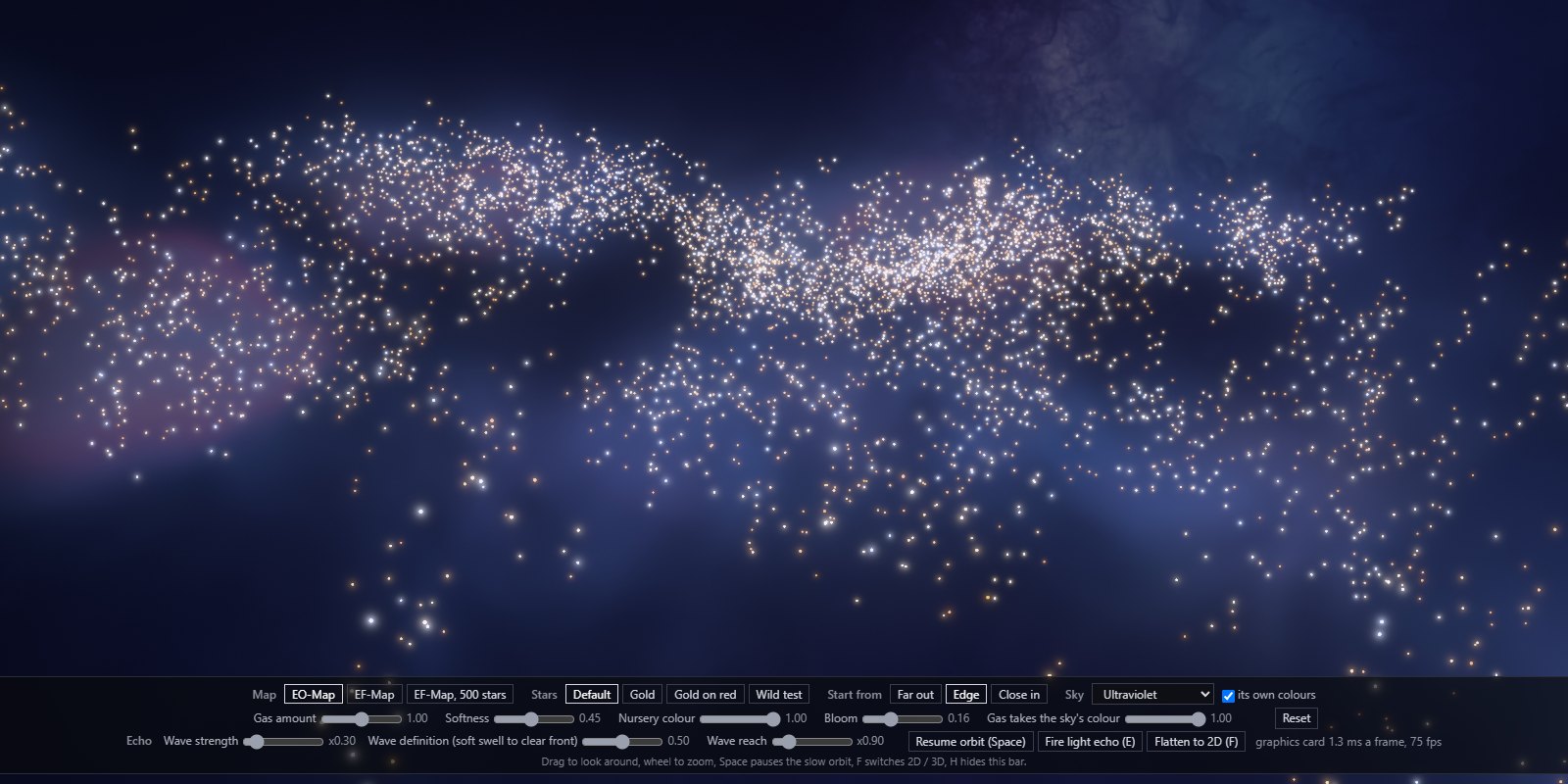
Most of what I said was taste, not engineering. The gas shouldn't change colour when you zoom, because a cloud is a thing in a place. It should be neutral dust that picks up its colour from the stars near it and the sky behind it. It should be softer than the first few tries. The supernova took the longest. The first version I couldn't even see, the second looked like a soap bubble. What I wanted was a flash that lights the gas up nearly white, and then a wave moving out through the gas that fades as it goes. The agent calls it a light echo. It took until round eight before I said that's exactly what I wanted, and then another few rounds to get rid of a faint circle I kept spotting when it was moving.
The other thing that came out of those two days was a rule that the two maps keep their own identity. EO-Map is blue and EF-Map is red. The same engine draws both, but they never get the same default sky.
One engine, two maps
The old Cinematic code existed in both maps, slightly different in each, which is twice the maintenance for one feature. I'd already found that a fix on one side tends to be wanted on the other, which is what Visual polish borrowed from my other map was about.
So the plan was one engine in one folder, and that folder is identical in both repos, byte for byte. It's 53 files, plus a list of what each one should hash to. The tests go red if a file stops matching that list, and a separate check warns if the two repos have drifted apart. The engine itself knows next to nothing about either game. Everything that makes a map itself is handed in from outside by a thin layer on each side. On EO-Map that's all 8,089 systems, known space and wormhole space, the 2D layout, real region names and a blue sky. On EF-Map it's only the systems players have charted so far, under a red sky.
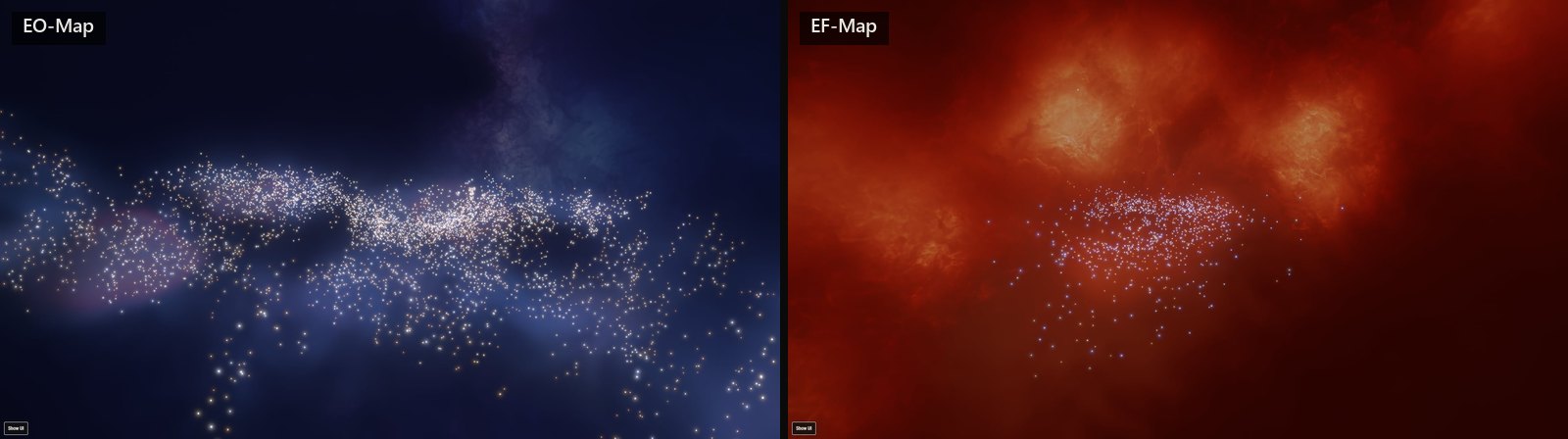
EO-Map went first, in five stages, each one built behind a hidden switch so the live site never saw a half-finished picture. First the measuring tools, then Cinematic Mode, then the film look on the working map, then Creator Mode, then the switch came out and the old code was deleted. That last stage removed 24,380 lines. Then EF-Map was a port of something already proven. That order was the agent's suggestion and I think it was the right one.
Creator Mode
Creator Mode is for people who want a scene to record. The old window had every slider I'd ever asked for, which is fine for me and hopeless for anyone else. What I asked for this time was easy mode. Pick a look, pick a finish, press record.
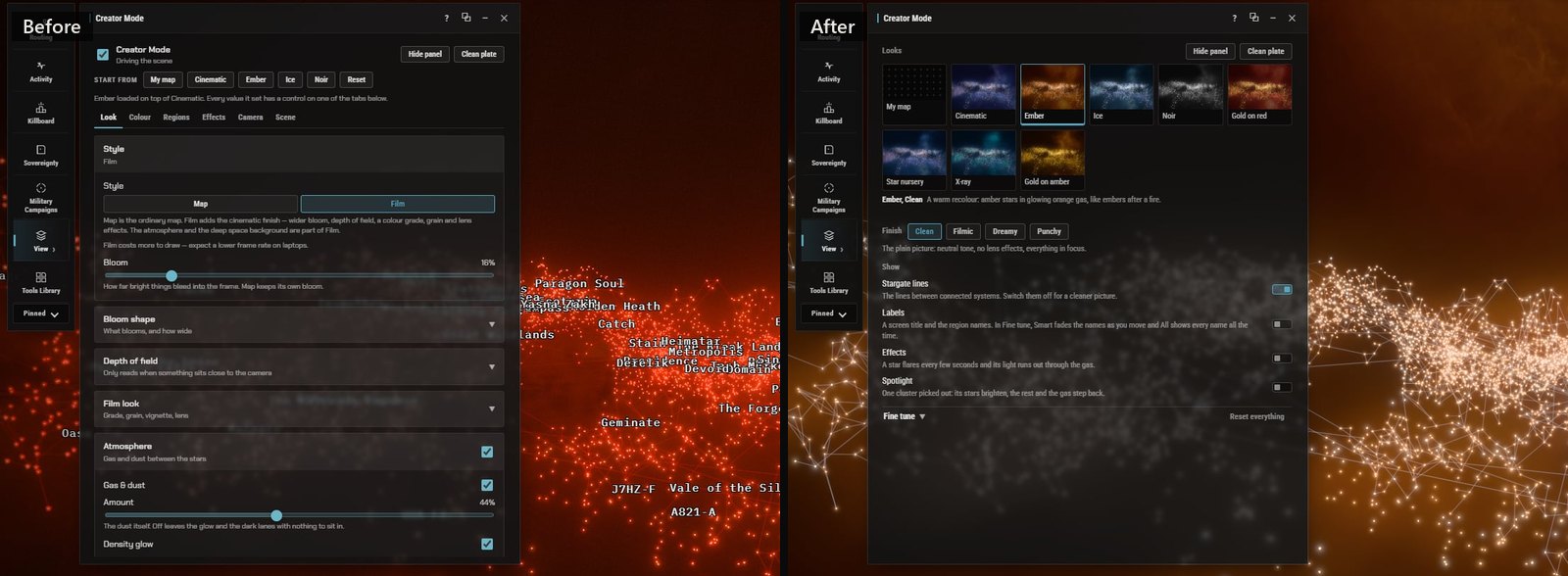
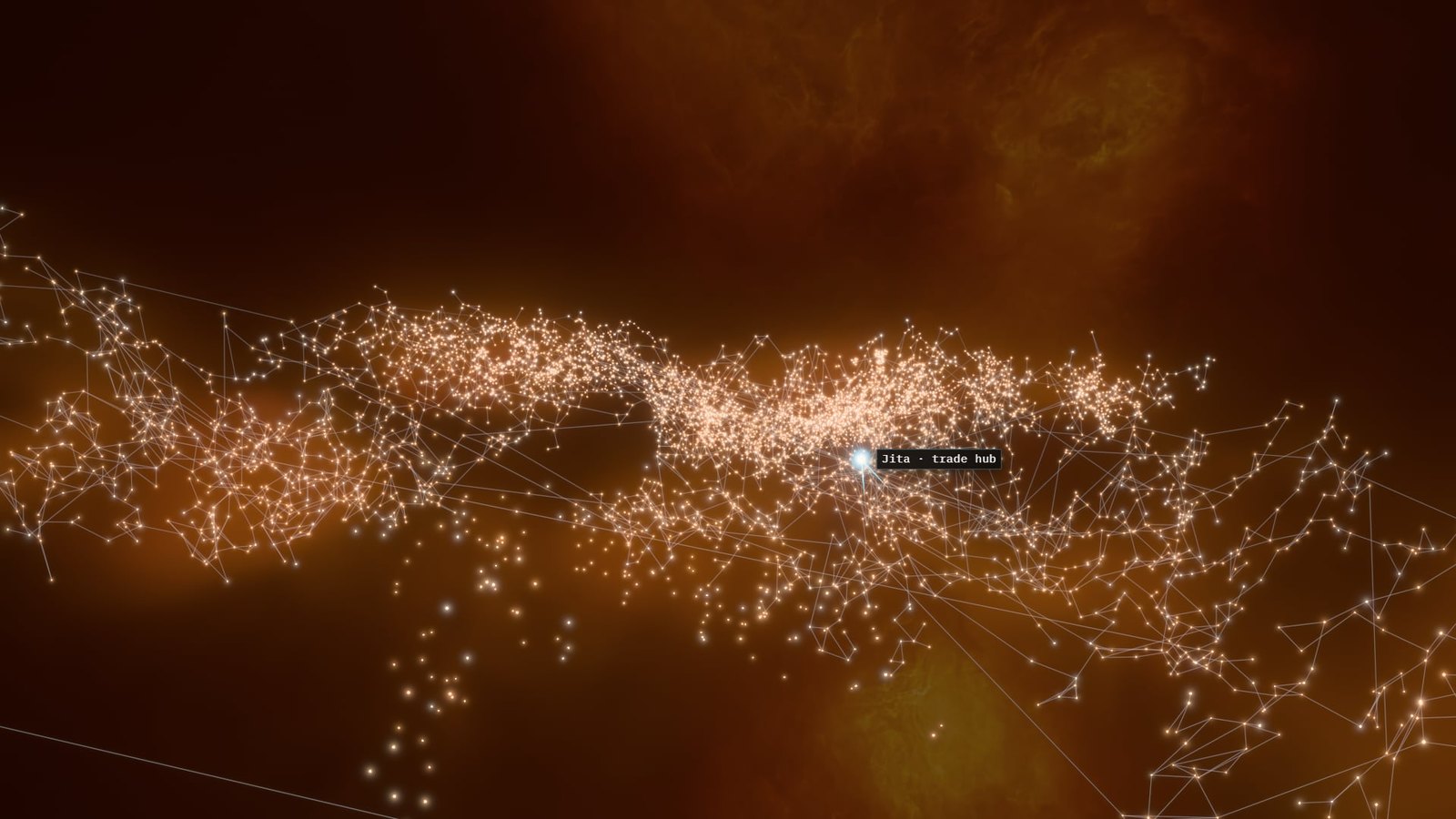
So it opens on a gallery. That's your own map as it is, plus eight looks, and four finishes on top of any of them. There are four switches for stargate lines, labels, effects and a spotlight on one cluster. The controls that survived are under Fine tune for the people who want them. The window went from 201 controls to 137. I went through that list with the agent, I didn't want a blind cut. One setting came out of a real complaint from someone flying the camera with a SpaceMouse, who found the region names popping in and out distracting. So there's an option that shows every region name all the time, and the smart fading is only the default.
The one thing I chose not to carry over was old saved scenes. Scenes saved in the previous Creator can't be opened in the new one. Nothing in anyone's browser was deleted, and it tells you once, but they don't load.
Display Settings
This one was me. Every change over the last year had added a tick box somewhere in Display Settings. Performance Mode on one card, Cinematic Effects on another, Universe Effects inside the Cinematic window. It had got unwieldy and a bit stupid, and it was different on each map.
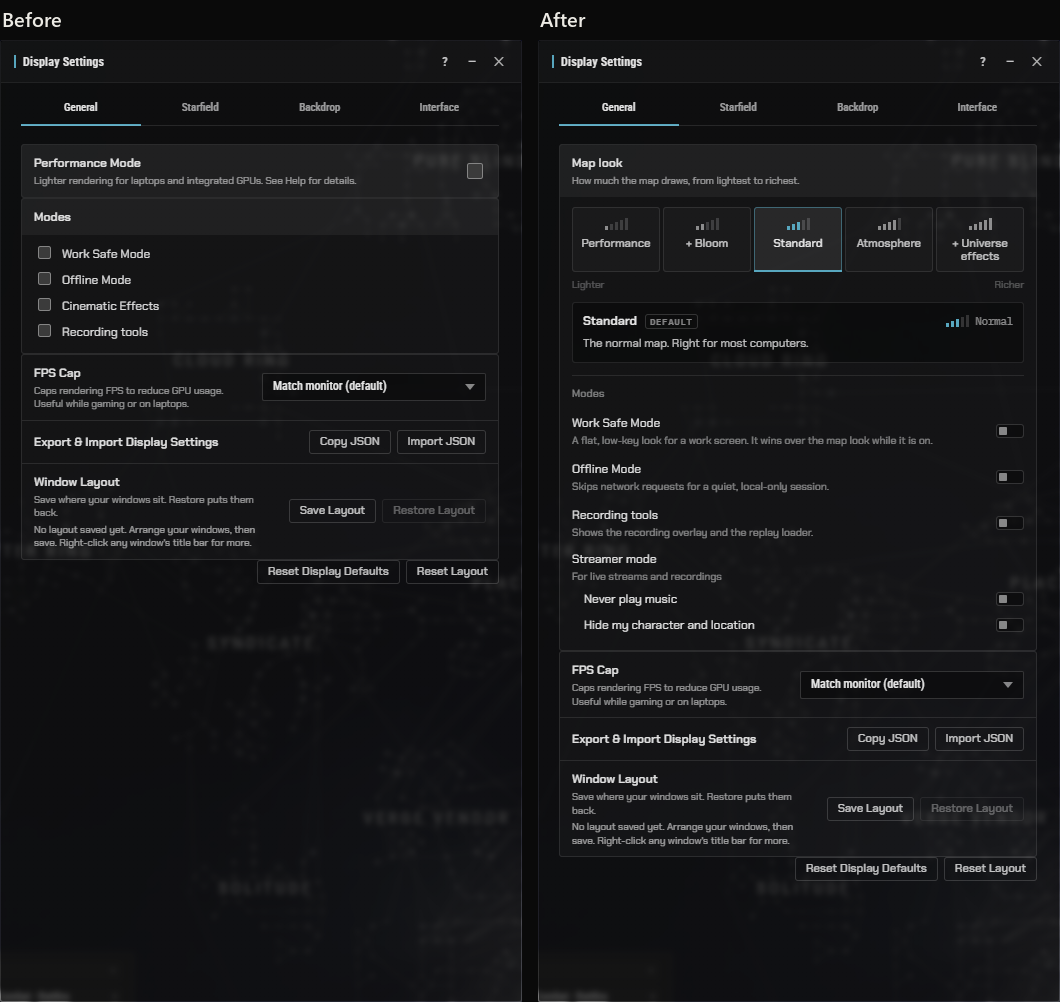
Now there's one row at the top called Map look, with five steps from lightest to richest. Performance, Performance with bloom, Standard, Atmosphere, and Atmosphere with universe effects. Atmosphere is the film look on the map you actually work in. It's the same row in the same place on both maps. Two of the old sky styles went as well, so the Backdrop tab is down to the painted sky and a minimal glow.
Was it faster
Here are the numbers for EO-Map. Graphics card time per frame, old against new, measured in the same run on the same build with the camera turning the whole time. This is my RTX 4070 SUPER, so treat it as one machine, not a benchmark.
GPU milliseconds per frame, camera moving, middle camera position, game closed
| Surface | Size | Old, ms | New, ms | New as a share of old |
|---|---|---|---|---|
| Cinematic Mode | 1920x1080 | 2.33 | 1.28 | 0.55 |
| Cinematic Mode | 2560x1440 | 4.10 | 1.99 | 0.49 |
| Cinematic Mode | 3840x2160 | 7.33 | 2.26 | 0.31 |
| Film look on the working map | 1920x1080 | 2.56 | 1.34 | 0.52 |
| Film look on the working map | 2560x1440 | 4.35 | 2.23 | 0.51 |
| Film look on the working map | 3840x2160 | 7.60 | 2.52 | 0.33 |
| Creator Mode | 1920x1080 | 2.44 | 1.32 | 0.54 |
| Creator Mode | 2560x1440 | 4.22 | 2.21 | 0.53 |
| Creator Mode | 3840x2160 | 7.44 | 2.52 | 0.34 |
Across all three camera positions, from far out to close in, new as a share of old runs from 0.16 to 0.55.
So roughly half the cost at 1080p and about a third at 4K, and from far out it's nearer a quarter at 1080p and a sixth at 4K. The bigger change is what happens when you stop moving. The old film look redrew everything, every frame, even when nothing on screen had changed. Over three seconds at rest it made about 6,800 draw calls. The new one makes none. It draws nothing at all when the map is still.
That headline run was with the game closed, because that's the only way to get a clean before and after. But this map is a second-monitor tool. Most people have it open while they're playing, so I care more about what happens with a game running. On my machine that game is EVE Frontier, which I'd guess is at least as heavy on a graphics card as EVE Online, though that is only a guess. The timings taken during the build were done with it open on the same machine, but the records can't tell me whether the game itself was running or only its launcher. So on EF-Map, which runs the same engine, I had the whole test run again with the game definitely running and the graphics card already 40 to 55% busy. At 1080p the old picture took 1.80 milliseconds a frame and the new one 0.90. With the game closed it had been 1.80 and 0.89.
EF-Map, Cinematic Mode, GPU milliseconds per frame, camera moving, middle camera position
| Size | Game closed, old | Game closed, new | Game running, old | Game running, new |
|---|---|---|---|---|
| 1920x1080 | 1.80 | 0.89 | 1.80 | 0.90 |
| 2560x1440 | 3.40 | 1.47 | 3.39 | 1.48 |
| 3840x2160 | 6.54 | 1.73 | 6.67 | 1.73 |
Both runs are EF-Map on the same machine and the same build. EF-Map has fewer stars on screen than EO-Map, which I think is why its figures are lower than the table above. Game closed and game running were both measured on 16 November, and the EVE Frontier client was running at the start and at the end of the second one.
So almost identical. Part of that is how it's measured. The test takes the fastest frame it sees, which is the cost of the drawing itself, and a game running alongside can only add waiting on top of that. So the saving is the same size either way. What changes with the game running is that there's less of the card left over to share, and that's when halving your own cost is worth having. If it runs fine next to the game on my machine, I think it's going to be fine for most people.
What it took
Claude Code keeps a transcript of every session, so I had the agent count this one up the same way it did for my month on Claude Ultra. These figures are for the whole job, both maps.
The first prompt went in at 01:25 UTC on 12 November. EO-Map went live on the 15th and EF-Map at 13:50 on the 16th, so 108 hours start to finish. In that time there were nine sessions, and between them they started 191 helper agents. That's 21,957 requests to the models and 6.38 billion tokens, and 98.2% of those tokens were the models re-reading the conversation so far from a cache, which is how these long sessions always look.
At Anthropic's published API prices that lot comes to $2,269. It isn't what I paid. I pay $200 a month for the plan. It isn't what it cost Anthropic to serve either. I think it's a fair yardstick for how much work got done though. Opus 5.5 did $1,842 of it, which is the helpers that did the building and the reviewing. Fable 5.2 did $397, running eight of the nine sessions and doing the planning. The very first assessment was actually Opus 5.5. Sonnet 5.5 did $30, mostly sitting through long test runs so the expensive models didn't have to.
The job in three parts
| Part | Sessions | Helper agents | My prompts | Agent-hours | Tokens | List-price cost |
|---|---|---|---|---|---|---|
| Assessment, mock-up and plan | 2 | 28 | 44 | 16 | 0.78 billion | $281 |
| EO-Map, five stages and follow-ups | 6 | 98 | 31 | 64 | 3.38 billion | $1,256 |
| EF-Map port and release | 1 | 65 | 2 | 32 | 2.22 billion | $731 |
EO-Map was the bigger half. Its five stages and two small follow-ups come to $1,256 of that and about 64 hours of agent time, against $731 and 32 hours for the EF-Map port, which is what going second buys you. There was at least one agent working for 71 of the 108 hours, with up to six going at once. My side was 77 prompts. About 12,500 words of that was me talking into a microphone. The rest was stage prompts the agent had drafted for me to paste into a fresh session, which is how I keep each stage's conversation small.
I had a theory that the token figure would be inflated. The orchestrating agent often sat waiting more than an hour for a helper to finish, and the cache it reads from only lasts an hour. So when it woke up it would have to take in the whole conversation again at double the normal price. I had that counted as well. It happened 16 times, 11 of them while it waited on a helper and five while I was away from the keyboard. It doesn't change the token count, because the same tokens get read either way, they just cost more when the cache has gone cold. Those 16 came to $57, about 2.5% of the total. The helpers have a shorter cache, five minutes, and theirs going cold cost more, $121, most of it while helpers sat waiting on their own long test runs. So I was right that it happens. It just doesn't matter much.
The agents weren't left to mark their own homework. Every stage ended with a separate review agent whose only job was to attack the work, and they earned their keep. The review of the very first stage, before any product code existed, found three blockers in the measuring tools alone. The one at go-live found one blocker and ten things that should be fixed. All of it was fixed before anything shipped.
What's left
It's live on both maps now. There are a few small things on the list. Supernovas and novas don't draw in a Creator scene with the gas off, which is how Creator opens unless your map is on Atmosphere, so that needs fixing in the shared engine on both sides. And I've only tested this in Chrome on one graphics card, so if it looks wrong in Safari or Firefox I'd like to know.
Open EO-Map, pick Cinematic Mode from the Tools Library and have a look, or set the map to Atmosphere in Display Settings. If something looks off, let me know and I'll get it sorted.
Related posts
- Creator Mode: compose EVE Online map scenes for video: the Creator Mode this one replaced, from September
- How EO-Map draws 8,089 EVE Online systems in three.js: how the map underneath gets drawn
- EO-Map's new visual polish came from my other map: the last time a fix went from one map to the other
- A Month on Claude Ultra: Where 19 Billion Tokens Went: October, counted the same way
- The same article on the EF-Map blog: with EF-Map's own pictures and timings